Конечный продукт!
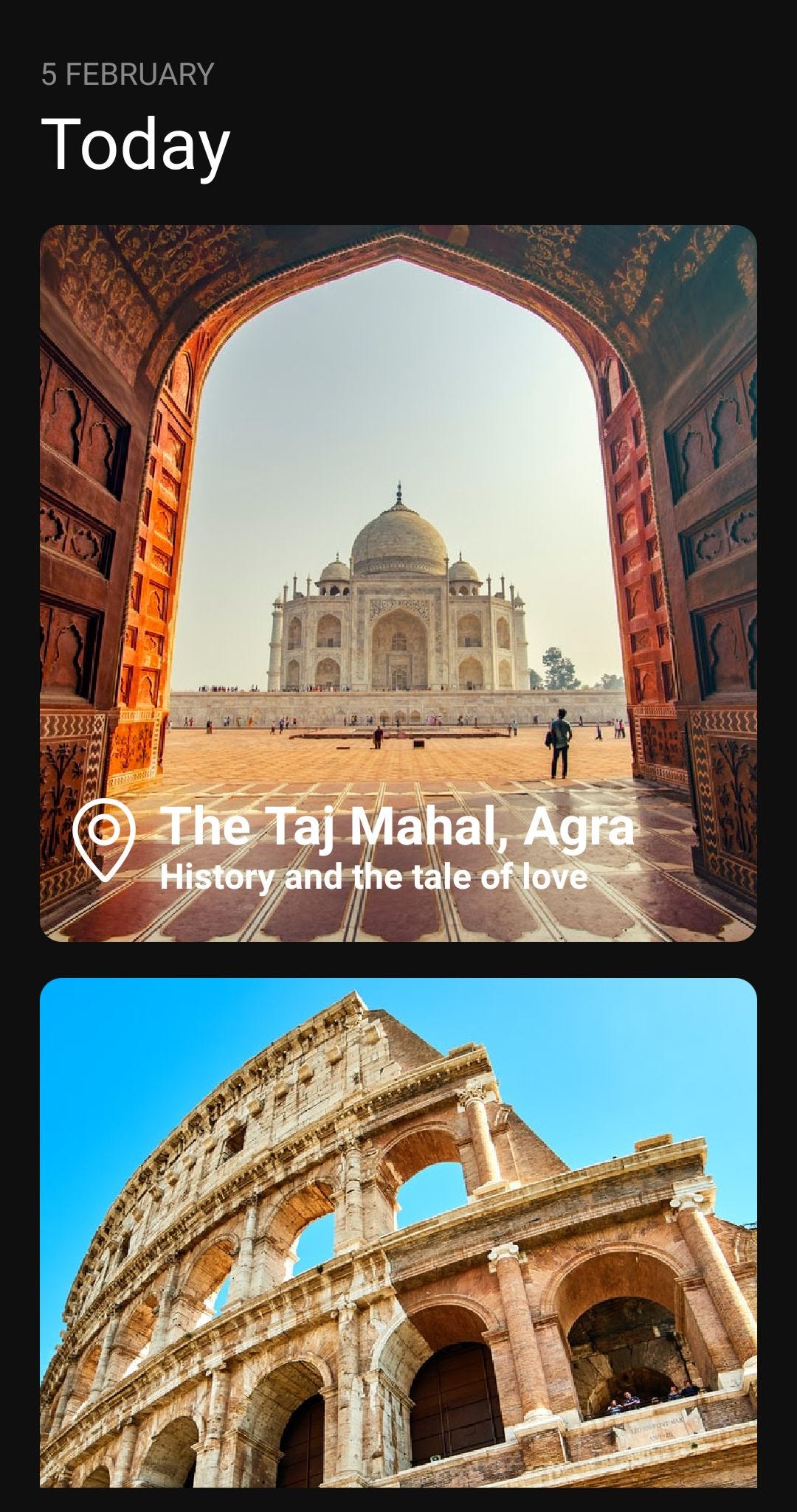
1.Настройка проекта:
import * as React from "react";
import { StyleSheet,Text,View,StatusBar,TouchableOpacity,Dimensions,
Image} from "react-native";
import { SimpleLineIcons } from "@expo/vector-icons";
import { FlatList } from "react-native-gesture-handler";
2. Чтобы показать дату и месяц
let Day = new Date().getDay();
const d = new Date();
const monthNames = ["January","February","March","April","May","June","July","August","September","October","November","December",];
3. Настройте размеры изображений с помощью Dimensions.get(‘screen’);
const { width } = Dimensions.get("screen");
const ITEM_WIDTH = width * 0.9;
const ITEM_HEIGHT = width * 0.9;
ITEM_WIDTH, ITEM_HEIGHT будут использоваться при изменении размера Image Prop.
4.Создание таблицы стилей
const styles = StyleSheet.create({
container: {
flex: 1,
backgroundColor: "#0f0f0f",
paddingVertical: 10,
paddingBottom: "15%",
},
text: {
color: "#fff",
},
title: {
color: "white",
fontSize: 24,
fontWeight: "bold",
lineHeight: 28,
},
description: {
color: "white",
fontSize: 16,
fontWeight: "bold",
lineHeight: 18,
},
});
5.Функция основного приложения()
export default function App() {
return (
<View style={styles.container}>
<View
style={{ marginTop: "5%", marginBottom: 20, paddingHorizontal: "5%" }}
>
<Text style={{ color: "#888", textTransform: "uppercase" }}>
{Day}
{` `}
{monthNames[d.getMonth()]}
</Text>
<TouchableOpacity onPress={() => navigation.navigate("DetailScreen")}>
<Text style={{ color: "#fff", fontSize: 32, fontWeight: "600" }}>
Today
</Text>
</TouchableOpacity>
<FlatList
showsVerticalScrollIndicator={false}
data={data}
renderItem={({ item }) => {
return (
<>
<View style={{ paddingBottom: "5%" }} />
<Image
source={{ uri: item.image_url }}
style={{
width: ITEM_WIDTH,
height: ITEM_HEIGHT,
borderRadius: 10,
}}
resizeMode="cover"
/>
<View style={{ position: "absolute", bottom: 20, left: 10 }}>
<View style={{ flexDirection: "row" }}>
<SimpleLineIcons
size={38}
color="white"
name={item.iconName}
/>
<View style={{ flexDirection: "column", paddingLeft: 6 }}>
<Text style={styles.title}>{item.title}</Text>
<Text style={styles.description}>{item.description}</Text>
</View>
</View>
</View>
</>
);
}}
keyExtractor={(item) => item.id}
/>
</View>
<StatusBar style="auto" />
</View>
);
}
6. Наконец, наши данные [‘которые должны быть отображены в нашем плоском списке’].
const data = [
{
id: "1",
title: "The Taj Mahal, Agra",
description: "History and the tale of love",
image_url:
"https://images.unsplash.com/photo-1548013146-72479768bada?ixlib=rb-1.2.1&ixid=MXwxMjA3fDB8MHxwaG90by1wYWdlfHx8fGVufDB8fHw%3D&auto=format&fit=crop&w=1055&q=80",
iconName: "location-pin",
},
{
id: "2",
title: "Colosseum, Italy",
description: "Flavian Amphitheatre",
image_url:
"https://images.unsplash.com/photo-1515542622106-78bda8ba0e5b?ixid=MXwxMjA3fDB8MHxwaG90by1wYWdlfHx8fGVufDB8fHw%3D&ixlib=rb-1.2.1&auto=format&fit=crop&w=1050&q=80",
iconName: "location-pin",
},
{
id: "3",
title: "Machu Picchu",
description: "Icon of Inca civilization",
image_url:
"https://images.unsplash.com/photo-1530999811698-221aa9eb1739?ixid=MXwxMjA3fDB8MHxwaG90by1wYWdlfHx8fGVufDB8fHw%3D&ixlib=rb-1.2.1&auto=format&fit=crop&w=700&q=80",
iconName: "location-pin",
},
{
id: "4",
title: "Christ the Redeemer",
description: "Art Deco statue of Jesus Christ",
image_url:
"https://images.unsplash.com/photo-1510333337682-fdd0eba357a4?ixid=MXwxMjA3fDB8MHxwaG90by1wYWdlfHx8fGVufDB8fHw%3D&ixlib=rb-1.2.1&auto=format&fit=crop&w=675&q=80",
iconName: "location-pin",
},
{
id: "5",
title: "Chichen Itza, Mexico",
description: "Mythical great cities",
image_url:
"https://images.unsplash.com/photo-1595450653862-394dfc73053d?ixid=MXwxMjA3fDB8MHxwaG90by1wYWdlfHx8fGVufDB8fHw%3D&ixlib=rb-1.2.1&auto=format&fit=crop&w=817&q=80",
iconName: "location-pin",
},
{
id: "6",
title: "Petra, Southern Jordan",
description: "Originally known as Raqmu",
image_url:
"https://images.unsplash.com/photo-1551171128-c5b124a4174c?ixid=MXwxMjA3fDB8MHxzZWFyY2h8MTV8fHBldHJhfGVufDB8fDB8&ixlib=rb-1.2.1&auto=format&fit=crop&w=600&q=60",
iconName: "location-pin",
},
{
id: "7",
title: "Great Wall of China",
description: "Built by the Ming dynasty",
image_url:
"https://images.unsplash.com/photo-1566234626884-8d1382c2842d?ixid=MXwxMjA3fDB8MHxwaG90by1wYWdlfHx8fGVufDB8fHw%3D&ixlib=rb-1.2.1&auto=format&fit=crop&w=1050&q=80",
iconName: "location-pin",
},
];
Все сделано!. Удачного кодирования :)